PDF Studio Pro PDF Software for Windows9.1.0
Publisher Description
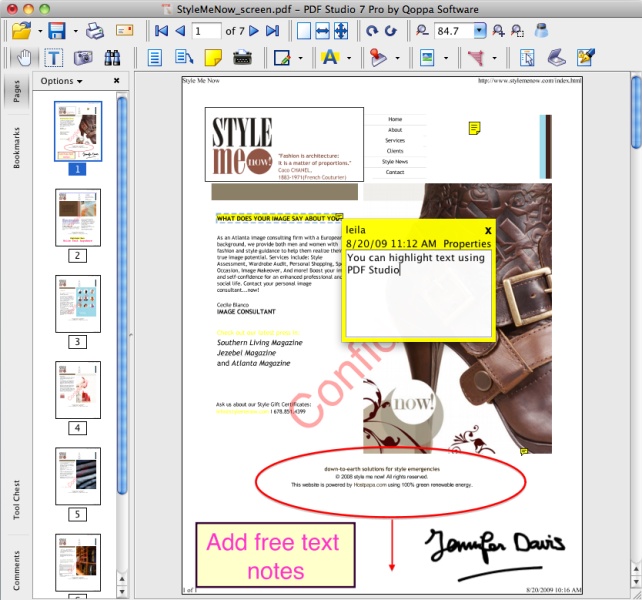
PDF Studio is an easy to use, yet powerful PDF editor for Windows 8; Also works on Mac and Linux / Unix. PDF Studio maintains full compatibility with the PDF format and supports most PDF functions.
This independent user tool enables these functions:
View, print, and search PDF files;
Review and Annotate PDF Documents with Text, Graphics, and Sound;
Scan-To-PDF;
Fill In & Save PDF Forms;
Secure Documents with Passwords and Permissions;
Merge/Split/Assemble Documents;
Convert to PDF documents from Word, Image, Text Files;
Add Bookmarks, Watermarks, Headers and Footers;
Integrated with documents services (Google Drive, Acrobat.com, Sharepoint).
Advanced PDF Studio Pro features include:
Content Editing (Text, Images, and Shapes);
OCR;
Interactive Form Designer with JavaScript Support;
Permanent Manual Redaction;
Batch Process Multiple PDFs;
Advanced PDF Split & Merge;
Precision Measuring Tools;
Digitally Sign PDFs;
Preflight PDFs with PDF/X Profiles;
Convert to PDF/A.
About PDF Studio Pro PDF Software for Windows
This Editors program is available in English, French, German, Italian, Spanish. It was last updated on 29 September, 2026. PDF Studio Pro PDF Software for Windows is compatible with the following operating systems: Other, Windows, Windows-mobile.
The company that develops PDF Studio Pro PDF Software for Windows is Qoppa Software. The latest version released by its developer is 9.1.0. This version was rated by 1 users of our site and has an average rating of 4.0.
The download we have available for PDF Studio Pro PDF Software for Windows has a file size of 51.4 MB. Just click the green Download button above to start the downloading process. The program is listed on our website since 2014-08-27 and was downloaded 138 times. We have already checked if the download link is safe, however for your own protection we recommend that you scan the downloaded software with your antivirus. Your antivirus may detect the PDF Studio Pro PDF Software for Windows as malware if the download link is broken.
How to install PDF Studio Pro PDF Software for Windows on your Windows device:
- Click on the Download button on our website. This will start the download from the website of the developer.
- Once the PDF Studio Pro PDF Software for Windows is downloaded click on it to start the setup process (assuming you are on a desktop computer).
- When the installation is finished you should be able to see and run the program.
Program Details
General
System requirements
Download information
Pricing
Version History
version 9.1.0
posted on 2014-08-27
Javascript, form filling validation and formatting, column-detection in text highlights, rendering speed, OCR for Windows, pan and zoom
version 7.4
posted on 2012-04-10
Enhancements and corrections to advanced features: document properties XMP Meta Data; forms filling; forms submit; Word to PDF conversion; bookmarks and links handling.
